佳譽資訊(股)公司-廣受學校機關、企業滿意推薦與信賴
.gif)
網路訂購.快速到貨.免收運費(更快速送達您手上∼不用讓您多等待)
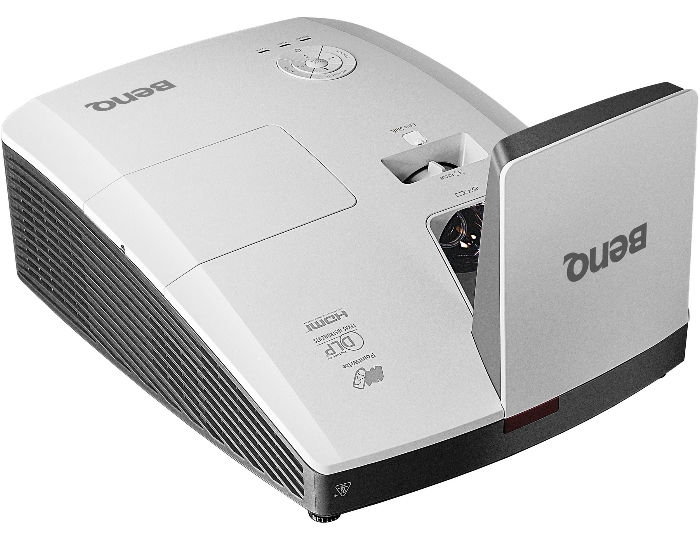
BENQ MW853UST+投影機

網路直購價$39,500

More Engagement, More Learning
Fun
A total classroom interactive
solution, the MW853UST+ offers
superior connectivity with ultra
short-throw design, dual HDMI
inputs and optional PointWrite™
interactivity. The 10,000:1
ultra-sharp contrast ratio,
3,200 ANSI lumen brightness and
lamp life are enhanced by the
SmartEco™ technology for long
lasting, reliable and vibrant
images. More, vertical lens
shift design offers more
installation flexibility.
|
 |
Interactive Learning with BenQ's Leading
Technology
Foster Active Learning Through PointWrite
Interactivity and Classroom Collaboration
Keeping students involved and engaged is a
central practice in the BenQ Smart Classroom
concept- simply integrating MW853UST+ with
latest PointWrite™ technology is a great way
to let multiple students contribute at once.
BenQ brings interactive innovation and touch
solutions to a new level of simplicity, ease
and control, supporting flipped learning and
engaging students like never before.
Teachers now can turn any space into an
interactive whiteboard and get up to 4
students to collaborate simutaneously with
PointWrite™ pens or simply with fingers. |
 |
|
PointWrite Features:
• Interactive on any surface
• Dual screen with multiple
touch capabilities
• Supports up to 4 pens/fingers
• Effortless setup with only 1
second auto calibration*
• An ultra-fast 0.016-second
response time for a smooth
writing experience
*Calibration speed may vary
depending on computer system.
**The function is available with optional
PointWrite Kit. |
 |
|
Dual Screen with Multiple Touch Capabilities
BenQ Dual Screen feature allows teachers to
create an immersive learning experienced by
connecting two PointWrite interactive
projectors to project two seamlessly merged
screens. This creates a super-sized space
for learning the solar system, virtual field
trip around the world, or simply a great big
canvas for co-creation. |
 |
|
|
|
Lens Shift for Extra Room for Minor
Miscalculations
Lens shift offers the extra flexibility to
overcome any minor miscalculations during
projector installation. All you have to do
is adjust the switch to shift the projected
image up or down by 4%. With this helpful
feature, you'll never have to worry about
positioning the projector slightly out of
place again! |
 |
|
Power Saving , Eco Friendly
Saving More on Power Consumption with BenQ’s
SmartEco™ Technology
Offering lower TCO and optimized projection
through dynamic power saving, uncompromised
brightness, exquisite picture quality and
optimized lamp life –SmartEcoTechnology has
perfected what a DLP projector can do. With
this innovation, schools and corporates are
able to save up to 70% of lamp power
consumption and lower maintenance costs
through dynamic power saving features while
bringing an ultra-vivid viewing experience
into every presentation. |
 |
|
SmartEco Mode: Power Smarter
By detecting the input content to determine
the amount of brightness required for
optimum color and contrast performance, the
SmartEco Mode is able to reduce lamp power
while delivering the finest image quality.
No compromise! |
 |
|
*SmartEco Mode, the dynamic power saving
mode,can save at least 70% power based on
the projection content level. |
|
Eco Blank Mode
The Eco Blank Mode, which lowers power
consumption up to 70%, can be used to blank
the projection screen when the projector is
not in use, in turn eliminating distractions
in class and redirecting students’ focuses
back on the teacher. |
 |
 |
|
Full Power On 100% Lamp
Power Attention on the
Projection Screen |
Eco Blank Mode On 30% Lamp Power
at the Lowest Attention on the
Class Instructor |
|
|
No Source Detected Mode
The automatic switch to Eco Blank Mode after
the projector is turned on for over three
minutes without a display source,
eliminating unnecessary energy waste and
prolonging the life of the projector lamp. |
 |
 |
|
Source Detected
100% Lamp Power |
No Source Detected
30% Lamp Power |
|
|
LampSave Mode: Save More
Less lamp replacements and maintenance
translates into an overall lower cost of
ownership. The LampSave Mode does exactly
that by adjusting the lamp power dynamically
by content level to extend projector lamp
life significantly by up to 50% as compared
to normal mode. |
 |
|
Good Things Come in Short Distance
Zero Space Constraints
You don't need a big room or a lot of free
ceiling space to create a big picture when
you've got an ultra short-throw projector!
Teachers can think outside the box to turn
every corner into the perfect place for
educational use. |
 |
 |
|
Non Short-throw |
Short-throw |
|
|
Zero Shadow Disruptions
An ultra short-throw projector can be placed
close to the screen in front of the class
and well out of students' way, greatly
decreasing the occurrences of shadow
disruptions. Teachers can enjoy teaching
without worrying about the class being
interrupted. |
 |
 |
|
Non Short-throw |
Short-throw |
|
|
Zero Eye-Blinding Lights
An ultra short-throw projector keeps the
projector light from shining directly into
everyone's eyes. The intensity of the
projector beam may be potentially harmful.
So it's for the best to keep it out of the
way. |
 |
 |
|
Non Short-throw |
Short-throw |
|
|
Blu-ray Full HD 3D Supported
BenQ MW853UST+ is built with latest DLP® technology
to support 3D functionlity, allowing schools
to bring an immersive learning experience to
their students with a simple preparation of
3D glasses and 3D content. |
 |
|
Hassle-Free Projector Maintenance
Projector Management through LAN Control
LAN Control is designed to help IT managers
perform day-to-day projector maintenance and
repair tasks efficiently and effectively –
offering them full access and control over
every projector directly from their
workstations. The MW853UST+ offers seamless
support for the Crestron and AMX LAN Control
system. |
 |
|
ecoFACTS Label
ecoFACTS can tell you how eco-friendly BenQ
products are!
Development of eco-friendly products, BenQ
doesn't just want to comply with green
regulations passively, but also to actively
develop eco-friendly products!
ecoFACTS declares BenQ's greatest efforts on
the replacement of hazardous substances,
material selection, packaging design,
energy-saving design and other aspects of
the products. |
 |
|
Arsenic-free optical glass
BFR/PVC-free casing plastics
PVC-free plastic packaging |
|
|
|
|
|
|
Projection System |
DLP |
|
Native Resolution |
WXGA (1280*800) |
|
Brightness* |
3200AL |
|
Contrast Ratio |
10,000:1 |
|
Display Color |
1.07 Billion Colors |
|
Lens |
F2.5,f=5.1mm |
|
Aspect Ratio |
Native 16:10 (5 aspect ratio selectable) |
|
Throw Ratio |
0.35 |
|
Image Size (Diagonal) |
Optimization 80"-100" / Maximum 300” |
|
Zoom Ratio |
Fix |
|
Lamp Type |
230W |
|
Lamp(Normal/Economic Mode/SmartEco Mode)* |
4000/5000/7000 hours |
|
Keystone Adjustment |
1D, Vertical +/- 40 degrees |
|
Projection Offset |
136%~144% (±5%) |
|
Resolution Support |
VGA(640 x 480) to UXGA(1600 x 1200) |
|
Horizontal Frequency |
15~102KHz |
|
Vertical Scan Rate |
23~120Hz |
|
Interface |
Computer in (D-sub 15pin) x 2(Shared with component)
Monitor out (D-sub 15pin) x 1
Composite Video in (RCA) x 1
S-Video in (Mini DIN 4pin) x 1
HDMI x 2
Audio in (Mini Jack) x 1
Audio out (Mini Jack) x 1
Audio L/R |
|
Dimensions(W x H x D) |
373.3*287.5*130.2mm (w/o Mirror)
373.3*287.5*201mm(w Mirror) |
|
HDTV Compatibility |
480i, 480p, 576i, 576p, 720p, 1080i, 1080p |
|
Video Compatibility |
NTSC, PAL, SECAM |
|
Weight |
5KG(w/o wall mount) |
|
Audible Noise |
33/29 dBA (Normal/Economic mode) |
|
Power Supply |
AC100 to 240 V, 50 to 60 Hz |
|
Power Consumption |
typical 290W, stanby power <0.5W |
|
On-Screen Display Languages |
Arabic/Bulgarian/ Croatian/ Czech/ Danish/ Dutch/
English/ Finnish/ French/ German/ Greek/ Hindi/
Hungarian/ Italian/ Indonesian/ Japanese/ Korean/
Norwegian/ Polish/ Portuguese/ Romanian/ Russian/
Simplified Chinese/Spanish/ Swedish/ Turkish/ Thai/
Tradi |
|
Picture Modes |
Dynamic/Presentation/sRGB/Cinema/(3D)/User 1/User 2 |
|
Accessories (Standard) |
Remote Control w/ Battery : RCE012
Power Cord (by region) : 2.9M
User Manual CD *1
Quick Start Guide *1
Warranty Card (by region) *1
VGA(D-sub 15pin) Cable *1
Dust filter(C SKU) *1
Wall mount kit (installation guide) *1 |
|
Accessories (Optional) |
Spare Lamp Kit : 5J.J8M05.011
Wall Mount : WM04G4
3D Glasses : DGD24
Document Camera : S30
PointWrite kit : PW01U
PointWrite Touch module : PT01 |
|
|
|

佳譽資訊股份有限公司
全國統一報價:(06)2036972(代表號) 授權專案報價中心
全國報修專線:(06)2036972分機21
佳譽資訊地址:台南市永康區復華七街167號
(以下為宏碁投影機維修服務中心)
基隆維修中心:基隆市中正區義二路158號1樓
台北維修中心:新北市汐止區新台五路一段88號3樓
桃園維修中心:桃園縣中壢市中央西路二段215號1樓
新竹維修中心:新竹市民族路139號7樓
苗栗維修中心:苗栗市新東街270號1樓
台中維修中心:台中市文心路一段371號1樓
彰化維修中心:彰化市中山路二段321號1樓
雲林維修中心:斗六市大同路212號1樓
嘉義維修中心:嘉義市上海路312號1樓
高雄維修中心:高雄市三民區九如二路595號1樓
屏東維修中心:屏東市瑞光路一段33號1樓
台東維修中心:台東市南京路141號1樓
花蓮維修中心:花蓮市中山路603號1樓
宜蘭維修中心:宜蘭縣羅東鎮光榮路342之1號1樓
澎湖維修中心:澎湖縣馬公市陽明路102號1樓
全國服務信箱:chiayu.ok@msa.hinet.net
PS:各地維修中心均負責acer投影機維修,若有需商品諮詢或詢價請洽佳譽資訊行銷部(06)2036972(代表號) |
2021/08/15網站更新
本文件的資訊若有修改,恕不另行通知。商品若缺貨或停產本公司保有接單與否之權利。
本網站規格若有誤,以原廠型錄或官方網站為主。網站報價若有誤,本公司保有修改更正或不接單之權利。
本網站內容或文件當中所提及之品牌及產品名稱或圖片均為其原所屬公司之版權、商標或註冊商標。
欲引用本站圖文,請先取得授權,本站保留一切權利。
Copyright © 1994-2021 CHIA-YU Web-Site. All rights reserved.
-
|
|